


What You Should Know About the Microsoft 365 Subscription Renewal Phishing Campaign
A high-fidelity Microsoft 365 impersonation campaign using fake renewal notices to harvest credentials and payment details.
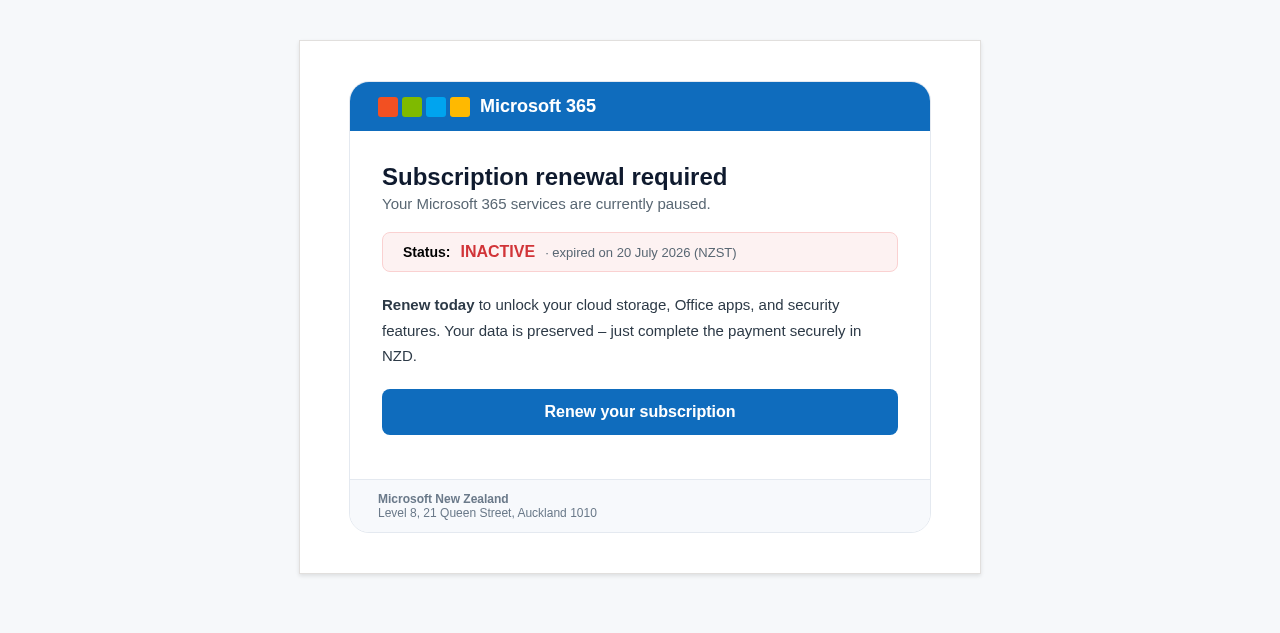
A widespread phishing campaign has been identified impersonating Microsoft 365, using a "Subscription renewal required" lure to target New Zealand organisations. The emails claim that services have been paused due to an inactive status, expired on 20 July 2026 NZST. By creating a false sense of urgency around loss of access to cloud storage and Office apps, the threat actors attempt to pressure recipients into completing a "secure payment" through a malicious link.
The lure is technically well-crafted, utilising official Microsoft branding, including the standard color-coded blocks and professional layout expected of a genuine billing notification. It even includes a fabricated Auckland office address and a local 0800 number to bolster the appearance of legitimacy for New Zealand users. This localised tailoring is designed to bypass the initial skepticism of staff who might otherwise flag an international notification as suspicious.
Technical analysis reveals that while the sender domain, tkcrenovations.co.za, passes DKIM checks, it soft-fails SPF and fails DMARC validation. This indicates a "clean" but misconfigured or compromised domain is being utilized to deliver the campaign, allowing it to bypass some reputation-based filters. The destination link, however, directs users to a fraudulent payment portal (hipocampo.com.ve) intended to harvest credit card details and M365 credentials.
Organisations are advised to educate staff on identifying these high-fidelity impersonations by focusing on the sender domain rather than visual branding. Genuine Microsoft billing correspondence will never originate from unrelated third-party domains. Any subscription or payment alerts should be verified independently by logging in directly at portal.office.com or via the official Microsoft 365 admin center, rather than utilizing links provided in an unsolicited email.
The domain the message claims to be from. Fresh registrations and known-bad reputations are the strongest technical tells of a spoofed sender.
Practical steps you or your IT provider can take to reduce the risk from this kind of threat.
• Verify subscription status independently. Do not use links in emails; log in directly to your Microsoft account at portal.office.com. • Audit external sender addresses. Train staff to check the sender domain (@tkcrenovations.co.za) against the claimed identity (Microsoft). • Report and Block. Add tkcrenovations.co.za to your blocklist and report the email to CERT NZ (report@phishing.cert.govt.nz).

See what a genuine Microsoft message looks like, the real sender domain, the real link destination, and where to report a fake.