


What You Should Know About Spoofed Union Membership Emails Targeting Inboxes
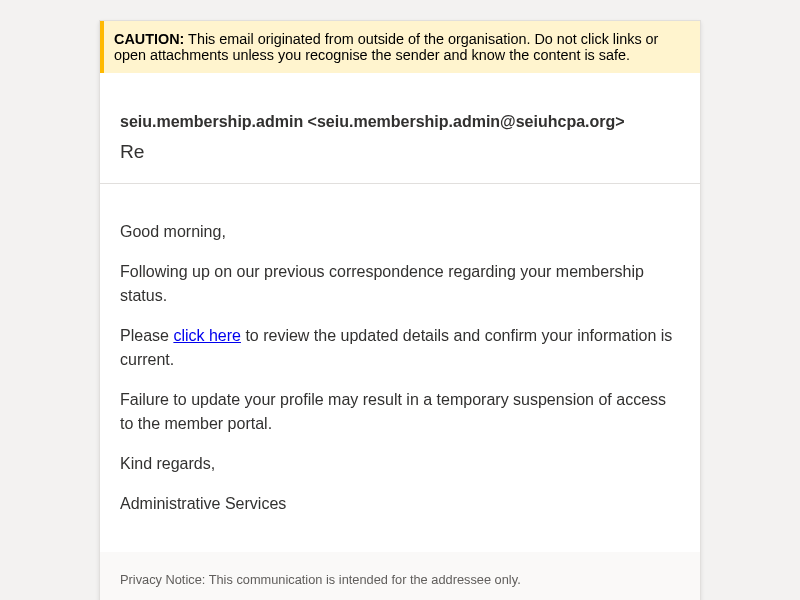
A phishing campaign has been identified leveraging administrative lures to deliver malicious correspondence to New Zealand organisation staff. The sender address deployed in this campaign presents as a membership administrator, using a legitimate-looking but external organisational domain to lend the communication an air of professional credibility. The subject line consists solely of "Re", a deliberate social engineering technique designed to simulate an ongoing conversation and lower the recipient's defensive threshold.
The use of a reply-thread subject line is a well-documented tactic employed to bypass both automated filtering systems and human scrutiny. Recipients are conditioned to treat messages appearing as continuations of prior exchanges with reduced suspicion, making this approach particularly effective in busy workplace environments where administrative or membership-related correspondence is routine. The threat was detected across multiple local environments, indicating a broad and untargeted attempt to engage staff with deceptive administrative follow-ups.
Technical analysis reveals that the campaign employs a reply-to mismatch strategy. While the From address appears to be an administrative contact, any direct reply or engagement is redirected to an entirely different, recently registered domain. This redirection is a hallmark of credential harvesting operations, designed to capture login details or personal information under the guise of a routine profile update. Despite the message originating from a domain with valid authentication records, the underlying intent is clearly deceptive.
Organisations are advised to treat unsolicited administrative correspondence with elevated caution, especially when they appear as part of a thread the recipient does not recall initiating. Staff should be encouraged to verify the authenticity of membership or profile update requests via known internal channels before clicking embedded links. Email security configurations should be reviewed to ensure that reply-to mismatches on inbound mail are flagged for user awareness.
The domain the message claims to be from. Fresh registrations and known-bad reputations are the strongest technical tells of a spoofed sender.
Practical steps you or your IT provider can take to reduce the risk from this kind of threat.
• Do not click any links or download attachments in the email, as it may lead to credential-harvesting sites or malware installation.
• Verify the sender's legitimacy by contacting the administrative department directly through an established, known-good communication channel before taking any action.
• Report the phishing email to your internal IT or security team immediately. You should also report the incident to CERT NZ via their website at cert.govt.nz or by forwarding the email to report@phishing.cert.govt.nz.
• Delete the email immediately from your inbox and trash folder to prevent accidental interaction.
• Reset credentials and enable MFA if you have already clicked a link or entered login information.